LrForge brings serious AI to Lightroom Classic — culling, natural-language search, genre-aware scoring, and lighting coaching — running entirely on your own machine. A plugin plus a companion app, built for working photographers who shoot more than one genre.
“Your images never leave your computer. Every analysis runs locally, privately, and without subscription fees.”
100% local. No cloud, no telemetry, no per-photo API bill — your catalog stays yours.
See it live
Four moments from a real benchmark on an unstaged 11-photo Grand Tetons shoot — the same Trust Report you’ll get on your own catalog, on your own machine.
Right inside Lightroom Classic
The Trust Report panel sits beside your actual Library grid — no export, no separate app to babysit, no round-trip.
A finished benchmark, no filler
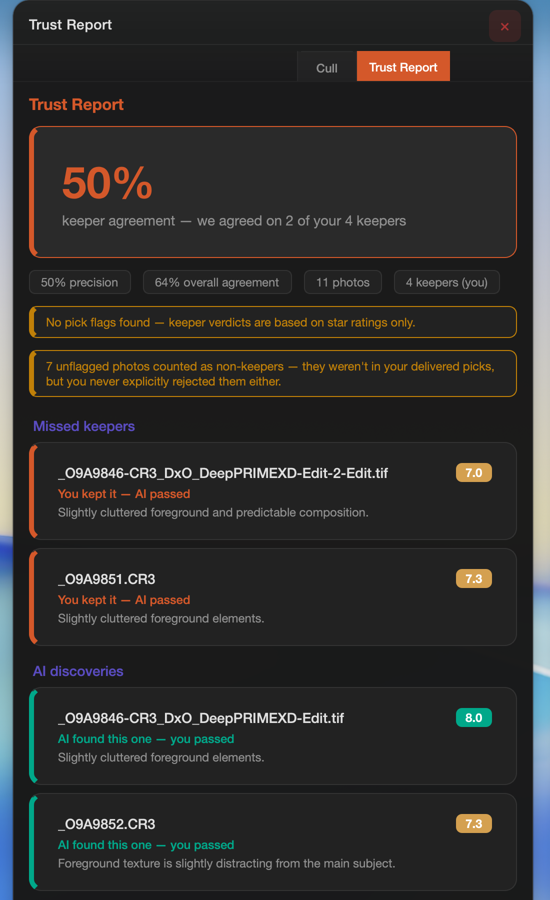
100% keeper agreement on a real shoot — precision, overall agreement, and photo count, all visible at a glance.
Scored blind, before you see a verdict
The AI commits to a score before it ever sees your star ratings — that discipline is what makes the benchmark mean something.
Both sides of the ledger
Every missed keeper and every AI discovery, each with a plain-English reason. Nothing gets quietly dropped.
What it does
Natural-language search
Find photos the way you think about them — “golden hour mountains,” “dramatic portrait with bokeh” — across your whole catalog, on your own hardware.
Genre-aware scoring
Eight expert critics — portrait, wedding, landscape, street, wildlife, sports, event, product — score composition, focus, and uniqueness with plain-English reasoning, not just a number.
Smart auto-cull
Three tunable profiles, a confidence score, and a human-readable “why” on every pick and reject. Never a black box.
Trust Report New
Benchmarks the AI’s cull against your real picks — scored blind, honest about every miss, exportable as HTML and CSV.
Best-shot detection
Shoots in bursts? LrForge finds the sharpest, best-composed frame in the sequence so you don’t review every shot by eye.
Lighting Coach Signature
A full studio-lighting critique plus the recommended setup — light position, modifier, power ratio, camera settings. No other Lightroom tool does this.
Catalog AI chat
Ask your photo library anything — answers grounded in your actual images, scores, and stats, not generic advice.
Local analytics
A 60+ field local database of every analysis — score distributions, model comparisons, SQL and Parquet export when you want the raw data.
The Trust Report
Every AI culling tool asks you to take its judgment on faith. LrForge doesn’t. Point the Trust Report at a shoot you’ve already delivered, and it benchmarks the AI’s blind scores against the picks you actually made.
Watch a real benchmark run, start to finish
An unstaged run on a real Grand Tetons shoot. Your numbers will be your own — that’s the point.
Why LrForge
Your models, your choice
LrForge runs on any of four local AI backends — Ollama, LM Studio, llama.cpp, or MLX-VLM — so it gets better for free every time open models improve. Fixed, proprietary vision models age; yours don’t have to.
Every genre, not just faces
Most photo-AI tools were trained to judge portraits and quietly fall apart on wildlife, landscapes, and sports. LrForge ships eight genre-specific critics because working photographers rarely shoot just one thing.
Zero Lightroom slowdown
Analysis runs in a separate companion process, not inside Lightroom’s own memory. No frozen catalog, no 100%-CPU imports — Lightroom stays as fast as it was before you installed it.
Accountable AI
Every score comes with a written reason, every cull decision can be benchmarked against your own picks, and every report can be exported and shared. If the AI is wrong, LrForge is built to show you where.
Private beta · Fall 2026
LrForge is in private beta with working photographers now. Tell us what you shoot and we’ll save you a seat.
Join the private beta